Felt Flight
Fly a paper plane over a stitched felt world.
Coming soon to Google Play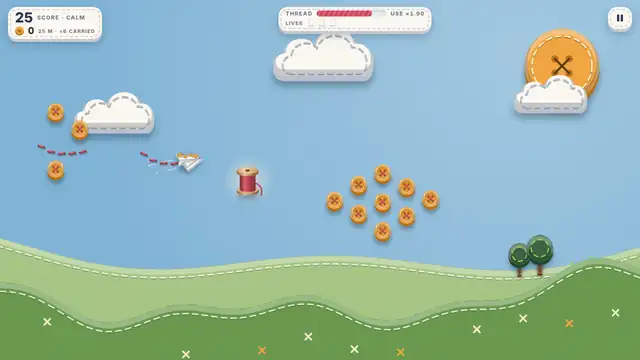
How to fly
Hold to climb, let go to glide
Your plane sews a trail of thread as it climbs. Climbing uses thread, so pick your moment and grab spools to top up.
Bank buttons for points
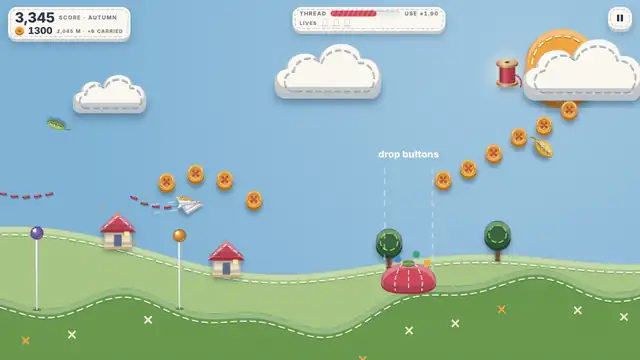
Buttons ride on your plane: heavier, but steadier in the wind. Glide over a pincushion to bank them. Bank 5 at once for ×1.5 points, 10 for ×2.
Loop the loop
Double tap to fly a full loop over a tall pin, or just for fun.
Thimbles are lives
Catch silver thimbles to fill up to three lives. A spare life puts your plane straight back in the sky. With three lives, you fly straight past them.
Sew felt patches
Bank 15 buttons into one pincushion to sew a patch onto your plane (up to 3). Each takes one hit from a pin, a leaf or the grass. With all 3 sewn, a big bank tops up your thread instead.
Five levels, five sceneries
Calm, Breezy, Autumn, Gale and Storm. Fly over a meadow, a lake with little felt boats, an autumn forest, a windy coast with lighthouses and the open ocean, where big ships sail under a grey storm sky. The water rolls in gentle waves. Wind bands lift you, push you down or slow you, and felt leaves, gull feathers and sea foam drift through the sky.
Collect and achieve
Look out for rare animals hidden in the scenery, and tap their label to collect a sticker. Earn felt badges for points, distance, long flights and buttons banked: 24 in all, from bronze to gold. Stickers and badges live on My shelf, opened from the main menu, and a badge can be shared as a picture. Everything is kept on the phone only.
- One-touch
- Plays offline
- No account
- Calm flight mode
- Stickers and badges
- Landscape or portrait
- High or Normal graphics
- Gentle music
For parents
Felt Flight is made for players of all ages, including young children.
- No chat, no accounts, no sign-in. Players cannot talk to strangers or find other players.
- One optional purchase. A one-time "Remove ads" is the only thing to buy. It's shown only in Settings, never during play, and Google Play can ask for your approval first.
- Child-safe ads. The free game shows ads from Google AdMob. Every ad is requested as child-directed, limited to ads suitable for general audiences, and not personalised. The app does not use the phone's advertising ID.
- No personal information collected by us. Scores and settings stay on the phone. We have no analytics and no servers.
- Plays offline. With no internet connection the game still works; ads simply don't appear.
- Calm flight for little ones. Turn it on in Settings: endless thread, no crashes and a slightly slower plane. The scenery still changes and friendly animals come by, so younger children can simply fly, watch and collect buttons.
- Gentle content. No violence, scary scenes or text chat. A crash just sends the paper plane fluttering down to the grass.
Full details are in the privacy policy.
Support
Found a bug, have an idea, or need help? Write to arunvt.dev@gmail.com. Please include your phone model if something isn't working.
Common questions
How do I reach the next level? Every 1000 m a stitched gate stands across the sky. Bank enough buttons in that flight to open it: 100 for Breezy, 350 for Autumn, 700 for Gale and 1,100 for Storm. Miss it and it comes round again 300 m later.
What is the button jar? Every button you bank goes into your jar, shown on the menu and in Settings. Spend jar buttons to start a flight at a level whose gate you've already opened (Settings → Start from).
What is My shelf? The main menu button that shows your milestone badges and the animal stickers you have collected.
How do I get a new version? Google Play updates the game for you. When an update is ready, the game also offers it on the menu; tap Update and keep playing while it downloads.
How do I switch to portrait? Settings → Screen → Portrait. Landscape follows your phone as it turns.
How do I turn off music, sounds or vibration? Settings has a switch for each.
The game feels slow on my phone. Settings → Graphics → Normal. The game also switches to Normal by itself if your phone struggles.
I bought Remove ads. How do I get it on a new phone? Sign in with the same Google account, then tap Settings → Restore purchase.
How do I reset my scores? Clear the app's storage in your phone's settings, or uninstall and reinstall. Nothing is stored anywhere else.